
What Makes Our Documents Smart?
Template Structure
With SmartDocuments FOUR, you can manage all your templates and documents from a central location.
What makes it unique is its intelligent template architecture. SmartDocuments divides templates into four distinct layers:
1. Corporate Design
Corporate Design serves as the visual foundation of your documents and ensures a consistent, professional appearance across all communications. It defines all key design standards, including:
- Fonts, font sizes, line spacing, and paragraph spacing
- Colors and page layouts
- Headers and footers
- And much more
2. Template Content
The Template Content layer contains the core content of your documents. This is where text, tables, images, and other document elements are created and maintained, ensuring that information remains consistent, accurate, and easy to update.
3. Building Blocks
Bausteine sind wiederverwendbare Inhalte, die in beliebig vielen Vorlagen eingesetzt werden können. Änderungen an einem Baustein werden automatisch in allen verknüpften Dokumentvorlagen übernommen.
4. Variable Data
Variable data represents the dynamic information used to populate a template during document generation. Data can be entered through the SmartWizard or supplied by connected systems and is automatically transferred into the document, ensuring accuracy, consistency, and efficiency.
"Thanks to this clear structure, template maintenance becomes much easier and more efficient."
Template Maintenance

Corporate Design Management
The marketing department can centrally define and maintain all template design elements, including logos, colors, fonts, font sizes, and more. As a result, even if users copy and paste content into a document or manually change formatting while creating documents or templates, the final output remains unaffected. SmartDocuments automatically applies the predefined design standards, ensuring that every generated document consistently adheres to your corporate identity.

Efficient Building Block Management
Reusable building blocks make template maintenance simple and efficient. Changes to standard content, such as text modules, addresses, bank details, or contact information, only need to be made once. SmartDocuments automatically updates all linked templates, ensuring consistency across your documents while saving valuable time and effort.

Template Content Management
Why maintain multiple versions of the same template? SmartDocuments uses rules to dynamically include or exclude content, allowing a single template to cover a wide range of scenarios. The result is less maintenance, greater consistency, and a much more efficient document management process.

Using Variable Data
Create documents in no time! Users enter the required information through the SmartWizard using an intuitive question-and-answer approach. This allows you to collect exactly the information needed to populate the template. You can also provide guidance such as help texts, explanations, and input validation rules for specific formats, including postal codes, dates, numbers, and text fields. Alternatively, variable data can be automatically imported from connected third-party applications, enabling fully integrated and highly efficient document generation processes.
How Does Your Data Get into Our Templates?
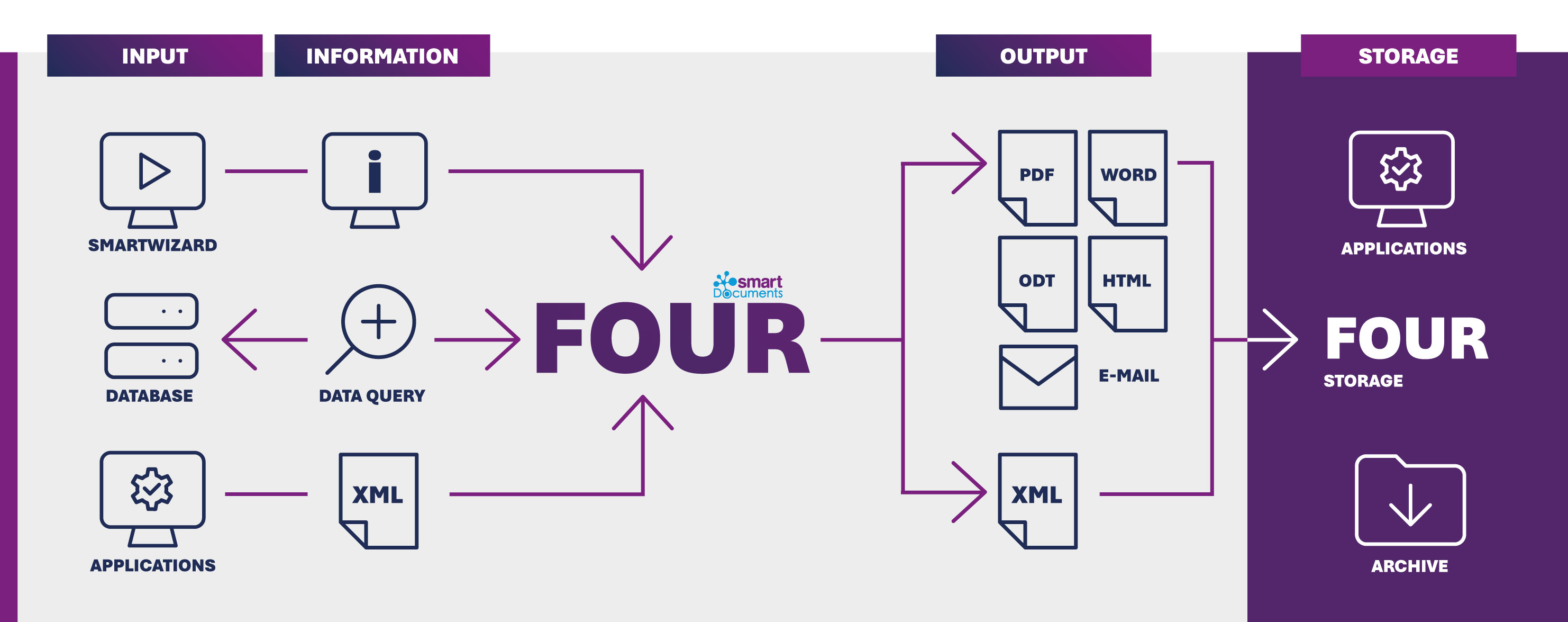
Three Ways to Bring Your Data into SmartDocuments Templates
SmartDocuments FOUR connects different data sources and applications to create a seamless document generation process. Information can be provided manually, retrieved from business applications and databases, or imported via XML files. The platform processes all data centrally and automatically generates documents in the required output formats. These documents can then be transferred directly to connected applications or archived in a secure and compliant manner for long-term retention.
Your Benefits at a Glance!
-
A Consistent Look and Feel Across All Documents (Corporate Design)
Keep every document perfectly on brand. With centralized corporate design management, updates to logos, colors, fonts, layouts, and other branding elements only need to be made once. SmartDocuments automatically applies these changes across all templates, ensuring consistent and professional communication throughout your organization.
-
Effortless Template Creation Without Programming Knowledge
Creating smart templates has never been easier. Add question elements with drag-and-drop, define rules and logic with just a few clicks, and build sophisticated document processes without writing a single line of code. Even complex requirements can be implemented quickly and intuitively by business users.
-
Integration with Existing Systems (DMS, CRM, ERP, and More) and Databases
Make the most of your existing IT landscape. SmartDocuments connects seamlessly with third-party applications and databases, allowing data to flow automatically into your document processes. This reduces manual work, increases efficiency, minimizes errors, and helps create fully integrated digital workflows.
-
Save Time! Increase Efficiency and Reduce Process Costs
Work smarter and save valuable time. Predefined templates help users create documents quickly and consistently, while SmartDocuments building blocks make updates effortless. Whether you're changing content, adjusting layouts, or updating standard information, templates can be adapted and kept up to date in no time.
-
Smart Template Usage with the SmartWizard Q&A Process
Creating documents has never been easier. Using the SmartWizard, users are guided through a simple question-and-answer process in their browser. Depending on the answers provided, SmartDocuments dynamically generates the document with the appropriate content, ensuring accuracy, consistency, and compliance while delivering the final document in the required format.
-
Smart Workflows for Seamless Collaboration
Smart workflows make teamwork easier. By working with shared templates, teams can ensure consistent communication and reduce duplication of effort. At the same time, SmartDocuments enables digital approval processes and end-to-end workflows, helping organizations automate tasks, accelerate decision-making, and increase productivity.